
Group Entity
Oct 12 2022 at 12:00 AM
Description
Entity group creates a folder structure under which entities can be created to be grouped together.
Configuration
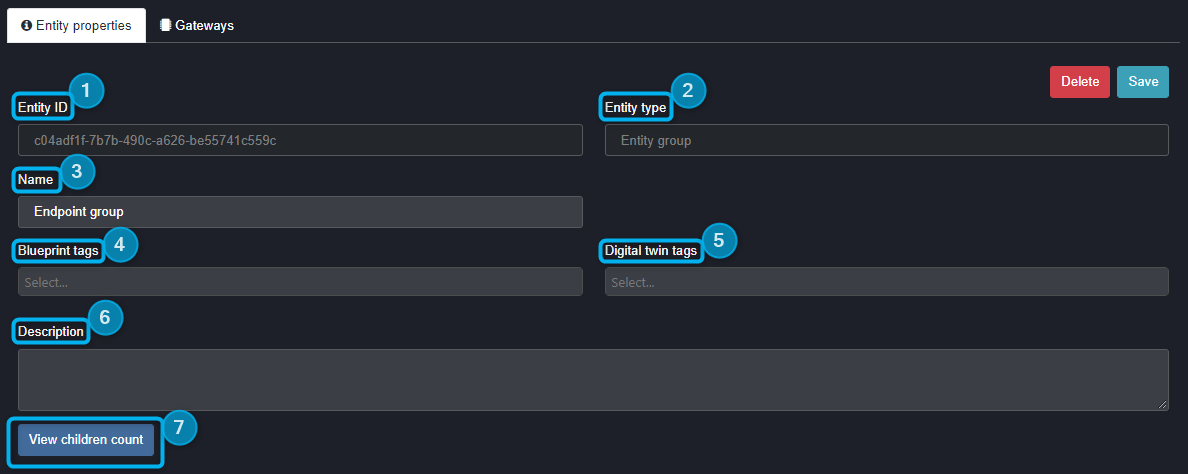
Figure 1 - Entity Gorup Properties
- Entity ID: This is a unique code for this entity, no other entity in this tree structure will have the exact same unique identifier. This property is autogenerated on the creation of the entity.
- Entity type: This is the specific entity you have chosen to use in your tree structure.
- Name: This is the name you will give your specific entity. It can be edited at any time after creation.
- Blueprint tags: The user can select from a list of existing blueprints and on the tenant to apply a blueprint. This area will also display any blueprints that are currently tagged to the entity selected.
- Digital twin tags: The user can select from a list of existing digital twin tags. Digital Twin tags can only be applied to Site or Group entities.
- Description: This feature allows the user to add a short description of the entity’s functionality.
- View children count: This feature will being up a window with information about entities created under the selected entity as children, such as the tally of children entities and/or their entity type. Please note that this is only available on Site and Group entities.
 |
| Blueprints are generally tagged onto Group Entities such that all entities within the Group Entity are grouped together. Blueprints can only be generated when selected on a Group Entity and that blueprint will then contain only the endpoints and functions that are in the Group Entity at the time of creation. |